Unable to connect

Learn more
Control Unit Disconnection Troubleshooting During Operation
CONNECTION

Control Unit Disconnection Troubleshooting During OperationHOT

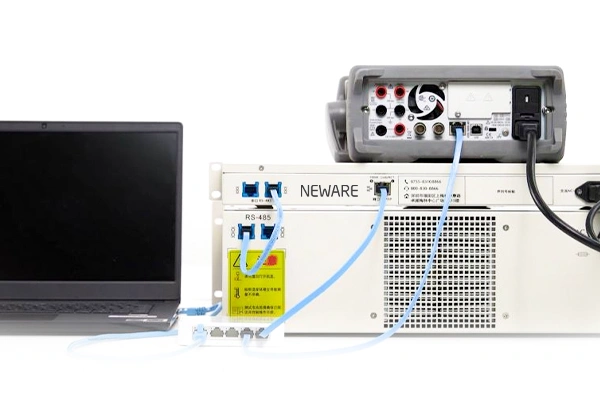
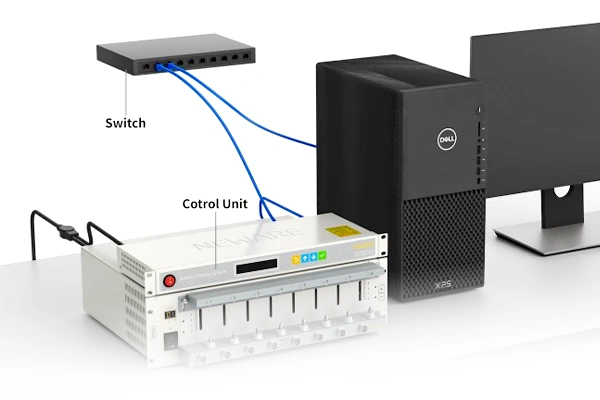
Step-by-step troubleshooting guide for Neware control unit disconnection: check service status, PC static IP, control unit IP parameters, and network cable connections.
Guidelines for Troubleshooting Equipment Connection Abnormalities
CONNECTION

Guidelines for Troubleshooting Equipment Connection AbnormalitiesHOT

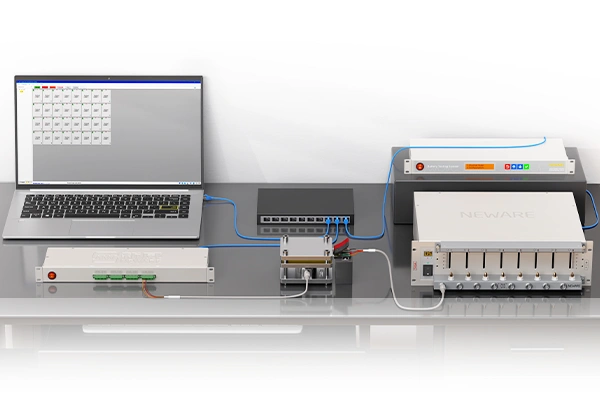
This guide introduces 7-step troubleshooting methods for communication failures between Neware control unit and computer. It covers wiring inspection, IP configuration, service status check, firewall settings, software repair, controller network parameter setup and ping test, helping users quickly solve connection problems of the battery test system.
Troubleshooting for MySQL And BTSServer Service Startup Issues
CONNECTION

Troubleshooting for MySQL And BTSServer Service Startup Issues

Three scenarios of NEWARE BTS MySQL and BTSServer startup faults, covering BTSServer reinstallation, MySQL forced startup and database table inspection solutions.
NEWARE BTS Connection Failure Troubleshooting Guide
CONNECTION

NEWARE BTS Connection Failure Troubleshooting GuideHOT

Troubleshooting steps for NEWARE BTS connection failure, including hardware check, IP configuration, firewall shutdown and service startup.
Precautions for connecting new and old equipment
CONNECTION

Precautions for connecting new and old equipment

Firstly, please confirm that the serial number of the newly purchased host computer or the auxiliary channel does not conflict with the serial numbers of existing old equipment.
Computer antivirus caused data to be unable to open
CONNECTION

Computer antivirus caused data to be unable to open

Solution 1: Recover data from the antivirus software quarantine area.Using 360 antivirus software as an example: Go to the Security Operations Center, then access the recoverable area.

System Settings

Learn more

Data Abnormality

Learn more
Overlapping of data measured at different rates
DATAS

Overlapping of data measured at different rates

Scenario Description: When performing a rate test with the BTS software, data may be superimposed on two adjacent loops of a rate transition.
Why is the impact of stopping the test on battery capacity less than the impact
DATAS

Why is the impact of stopping the test on battery capacity less than the impact

Issue description: In testing devices of the same model, the impact on capacity after a 9-hour stoppage is less than 1%, while the impact on capacity after a power outage followed by restoration is as high as 4%.
After downloading channel data in the BTS 8.0 interface, the NDA data cannot be opened
DATAS

After downloading channel data in the BTS 8.0 interface, the NDA data cannot be opened

Issue description: In the data download interface, the progress bar shows a successful 100% download. Upon checking the NDAdata folder, the downloaded NDA data is present. However, double-clicking to open the data results in no response. Additionally, multiple BTSDA processes are found running when checking the task manager.
The operating condition and pulse step recording time are not the same as absolute time
DATAS

The operating condition and pulse step recording time are not the same as absolute time

The recording time, also known as relative time exported in reports, is the execution time of the Control Unit steps. Absolute time is the same as computer time, continuously running, including stops, pauses, protections, etc.
Superposition of data measured at different rates
DATAS

Superposition of data measured at different rates

Scenario Description: When performing a rate test with the BTS software, data may be superimposed on two adjacent loops of a rate transition.
Different versions of software open data differently
DATAS

Different versions of software open data differently

Scenario Description: Some users test computer and data processing computer are separate, there may be a big difference between the data opened by the two computers. The following programs can be troubleshooting and processing.

Software Function Failure

Learn more
Constant voltage step abnormality
SOFTWARE

Constant voltage step abnormality

Instructions for constant voltage charge/discharge testing with fixed current range
BTS 8.0 Software: NDA data file cannot be opened
SOFTWARE

BTS 8.0 Software: NDA data file cannot be opened

During battery charge/discharge testing using BTS 8.0 software, the NDA data file cannot be opened normally when attempting to access it on a different computer after the test is completed.
How to Diagnose Long-Time Sampling Data Error on Specific Channels?
SOFTWARE

How to Diagnose Long-Time Sampling Data Error on Specific Channels?

Learn the troubleshooting method for the "long-time sampling data error" warning on specific channels of NEWARE test equipment, including 485 communication check and swap test guidance.
Common questions regarding historical data continuity
SOFTWARE

Common questions regarding historical data continuity

1. Can NDA data from 4S_4.x be used for historical data continuity on the 4S_8.x Control Unit? No, currently historical data continuity only supports the use of the same type of Control Unit on the same server.
Server disk space full: database migration guide
SOFTWARE

Server disk space full: database migration guide

Facing the issue of full disk space on your server and need to relocate your database to a new disk? Follow this step-by-step procedure to ensure a seamless transition.
The exported data does not contain AUX auxiliary channel data
SOFTWARE

The exported data does not contain AUX auxiliary channel data

Open the "System Settings" interface of the BTS client, and in the "Data Download" section, check if there is an option for "Export Auxiliary Channel Data." If the issue persists, it may be a bug. Please provide feedback to the after-sales team for resolution.

Hot Questions

View all FAQs

Common Questions

Everything you need to know about NEWARE battery testers

NEWARE testers cover the full spectrum: coin/button cells, cylindrical (18650, 21700, 4680), prismatic, and pouch cells. Voltage ranges from 5mV to 200V, current from 100nA to 3000A, supporting materials research through production-line testing.
All NEWARE cyclers include BTS (Battery Test System) software at no extra cost. BTS supports test scheduling, real-time monitoring, data logging, analysis, and report generation. It runs on Windows and supports LAN/USB connectivity with multi-user access.
Standard models offer voltage accuracy of ±0.02% FS and current accuracy of ±0.02% FS. High-precision CT-4008 series achieves ±0.01% FS for both voltage and current, suitable for advanced electrode material characterization.
Yes. NEWARE provides custom solutions covering voltage range, current rating, channel configuration, form factor, and software features. Please contact our application engineers to discuss your requirements. The lead time will be confirmed based on the actual scope of your custom project.
Our products come with standard warranty coverage. NEWARE delivers global after-sales support and technical solutions, including guidance for common operational and software-related issues. For detailed warranty terms and policies, please consult your local authorized distributor or contact us directly.
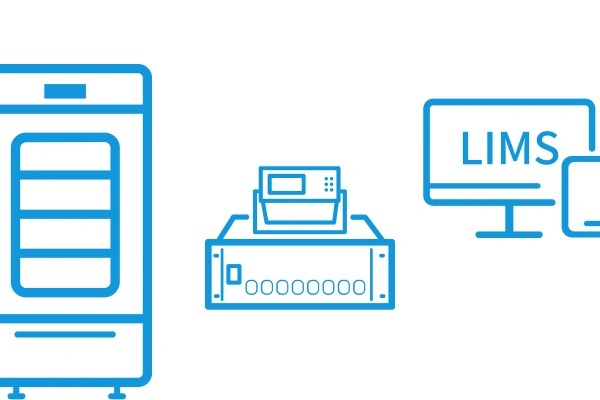
Yes. NEWARE cyclers support standard communication protocols (LAN, USB, RS485) and can integrate with environmental chambers, glove boxes, and LIMS systems. The BTS software provides API access for custom automation and data pipeline integration.

Still can't find your answer?

Our application engineers are ready to help with technical issues, calibration requests, and custom testing solutions.

NEWARE and Cookies
We use cookies to personalize and improve your experience with our website. By continuing to browse the site you are agreeing to our use of cookies.