Frequently Asked Questions

All Frequently Asked Questions

Automatic stop when rest
SOFTWARE

Automatic stop when rest

When the battery stops automatically during the set-aside process, it's possible that it's restricted by protection conditions. Modifying the protection conditions should resolve the issue.
Unable to export excel data
DATAS

Unable to export excel data

Solution 1: Check the version of Excel. For exporting Excel curve data in version 7.6.0, you need to install Excel 2003 or Excel 2010. Other versions of Excel are not compatible.
No display of the curve chart or abnormal curve
DATAS

No display of the curve chart or abnormal curve

Solution 1: In order to ensure the normal export of curves, users need to install Excel version 2010 or higher.
How to set and free parallels
SYSTEM

How to set and free parallels

Attention: 1.Channel parallel support only 50A or higher devices. 2.The current range after parallel is the sum of the ranges of each channel. 3.All positive sampling lines and all negative sampling lines of the parallel channel are connected separately. It is then used as the positive and negative lines of the parallel channel.
No cut-off current is set for constant voltage charging
SYSTEM

No cut-off current is set for constant voltage charging

Open the BTS8.0 software, click "Set" in the menu bar at the top of the page, and click "System Settings".
Bring up the hidden C-rate step parameter
SYSTEM

Bring up the hidden C-rate step parameter

Open the BTS8.0 software, click "Set" in the menu bar at the top of the page, and click "System Settings".
Solutions to Modify Control Unit IP Address
CONNECTION

Solutions to Modify Control Unit IP AddressHOT

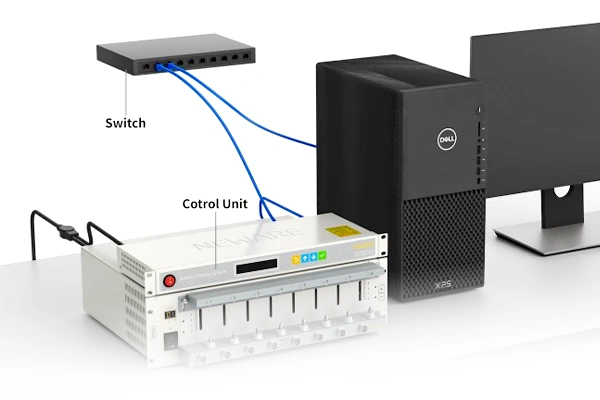
Two methods to change NEWARE control unit IP: modify via device configuration menu, or update control unit IP inside BTS software, including server IP matching requirement for PC ethernet.
Change in control unit number
CONNECTION

Change in control unit number

If you observe a change in the control unit number during testing, it might indicate a program error, and you should contact the after-sales department.
When mapping 10 devices, only 8 are displayed
CONNECTION

When mapping 10 devices, only 8 are displayed

The default mapping mode for the client is 1*8, which can be changed to the main channel default mapping 1*16 in the BTS software.
The device automatically disconnects and then automatically reconnects
CONNECTION

The device automatically disconnects and then automatically reconnects

Check if the network connection between the computer, switch, and the device is normal.
Voltage & current cannot be stabilized
 Voltage & current cannot be stabilized
SOFTWARE

Voltage & current cannot be stabilized

Solution 1: Check if the fixture has poor contact, readjust or replace the fixture as needed.
Solution 2: The equipment does not have a negative power supply, so it cannot be discharged to 0V, and constant current discharge at low voltage should be avoided. Please reset the test steps accordingly.
Solution 3: The issue may be caused by a faulty PIO board leading to the protection of the lower computer. It requires replacing the PIO board to restore communication. Please contact the after-sales department to resolve this problem.
The exported excel data displays garbled characters
DATAS

The exported excel data displays garbled characters

It may be caused by Excel version incompatibility. Please try again after changing the Excel version.
How to display the devices under different control unit in one interface
SYSTEM

How to display the devices under different control unit in one interface

You need to use the mapping to the virtual control unit. In BTSV, combine two control unit into one virtual control unit, and the channels below the control unit will be displayed on the control unit.
Power outage caused box number confusion
SOFTWARE

Power outage caused box number confusion

Modify the equipment box number through the calibration software or box number modification software. It is not recommended to perform this operation on your own. Please contact the after-sales department for assistance.
Unable to start/continue after power outage
SOFTWARE

Unable to start/continue after power outage

After power on, if the channels cannot start, it may be due to the device not being connected or the database mapping table being damaged.
Solution 1: Check the physical connection status of the device. First, check if the host computer has detected the lower computer. Once detected, the lower computer indicator light will be lit. Then, verify if a user has logged in.
Solution 2: Database repair is required. Use the script tool for database repair. Please contact the after-sales department for assistance with database repair.
Abnormal auxiliary channel sampling
SOFTWARE

Abnormal auxiliary channel sampling

We recommend sending it back for factory repair.

Hot Questions

View all FAQs

Still can't find your answer?

Our application engineers are ready to help with technical issues, calibration requests, and custom testing solutions.

NEWARE and Cookies
We use cookies to personalize and improve your experience with our website. By continuing to browse the site you are agreeing to our use of cookies.